


Convert videos to audio with Batch Video to MP3 and AAC! Extract audio from your videos and save it in MP3, AAC, FLAC, OGG, WAV or MP2 format. Select multiple videos and convert them in batches with one simple and convenient app.
KEY FEATURES
- Batch video to audio conversion: Select multiple videos at once and convert them to audio files in a single batch. Save time without having to process each video individually.
- Six audio output formats: Convert your videos to MP3, AAC, FLAC, OGG, WAV or MP2. Choose the audio format that best suits your needs.
- Wide video format compatibility: Select videos in MP4, WebM, MKV, MOV, AVI and 3GP formats.
- Lightweight app: The app is small and takes up only 5.5 MB of storage space, making it a compact video-to-audio converter for your device.
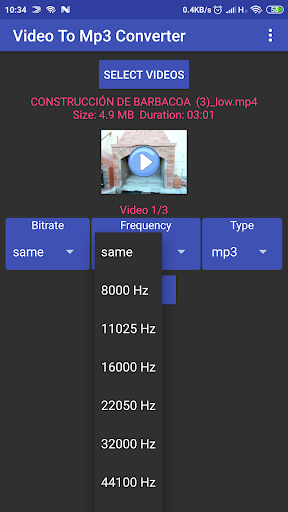
- Audio quality settings: Choose the bitrate and sample rate for your conversions. Select "Same" to preserve the original video's audio quality settings.
- Video preview: Quickly preview your selected videos before starting the conversion process.
- Audio playback: Play converted audio files directly in the app to check the result without leaving the app.
- MP3 ID3 tag editor: Edit the tags and metadata of your created MP3 files.
- Conversion notifications: Receive a notification when batch processing is complete. You can configure this option in Settings.
- Video thumbnails: Easily identify your videos using thumbnails in the file picker.
CONVERT VIDEOS TO AUDIO WITH EASE
Whether you need a video to MP3 converter, want to extract audio in AAC, or prefer FLAC audio, this app makes it easy to convert multiple videos into audio files.
Select your videos, choose your preferred audio format and quality settings, and let the app do the work.
Download Batch Video to MP3 and AAC and enjoy convenient batch video to audio conversion!